Ticket Creation & Management
Create tickets with contact details, a rich-text description, category, department, priority, assignee and an optional attachment. Search, filter, download a ticket or export the list to Excel.
Product overview
The Ticket Management System is a ready-to-use helpdesk and request-tracking portal. Your team logs each request as a numbered ticket, routes it to the right department, assigns an owner and follows it from Open to Closed, with comments, attachments and a full activity history on the same page.
Around the tickets, the portal adds the tools support teams use every day: user roles and permissions, departments, tasks, shared files, notifications, reports, email and WhatsApp communication, quotations and website monitoring. It replaces scattered emails, chats and spreadsheets with one organised system.
Log, prioritise and resolve internal technology requests.
Track issues and change requests with owners, comments and files.
Manage client requests, tasks, quotations and communication from one portal.
Raise requests to IT or support and follow them through to completion.
Every request becomes a numbered ticket (for example TCK-0004) with a single history, so nothing gets lost.
Assign each ticket to a team member and reassign it in one click. The new owner is notified by email.
Status, priority, department and a full activity history show exactly where each ticket stands.
Role-based permissions control what each role can read, write or delete in every module.
Tickets reach the right department and owner straight away.
Every ticket has an owner, a status and a history.
Each role sees only what its permissions allow.
Dashboards and reports show where work is piling up.
Features & modules
Every module below is part of the product today. Each one has its own permissions, so each role sees only what it should.
Create tickets with contact details, a rich-text description, category, department, priority, assignee and an optional attachment. Search, filter, download a ticket or export the list to Excel.
Record the contact person and number on every request, open a WhatsApp chat from the ticket, and send email or WhatsApp messages from the Communication module.
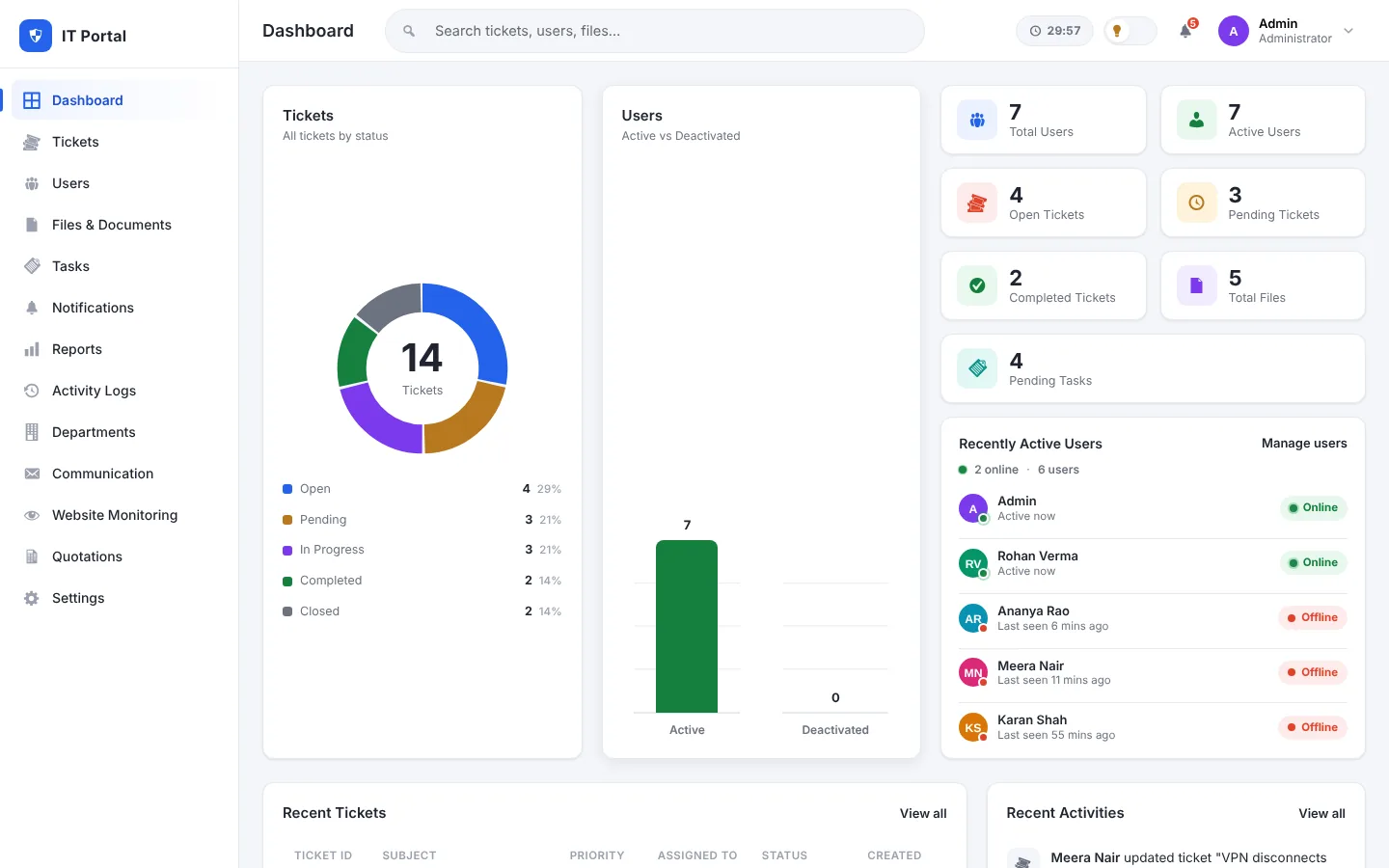
See tickets by status, who is online, recent tickets and recent activity the moment you sign in.
Add and edit users, give each one a role, and activate or deactivate accounts without losing their history.
Create departments and route each ticket to the team that owns it. Ticket counts per department stay visible.
Assign a ticket to a team member and reassign it later. The new owner receives an in-portal notification and an email.
Mark tickets Low, Medium or High with colour-coded badges, and choose the default priority for new tickets.
Follow each ticket through Open, Pending, In Progress, Completed and Closed, with optional auto-close after a set number of days.
Automatic emails for new tickets, assignments, reassignments, ticket confirmations and status changes to the requester.
Discuss the issue in a comment thread on the ticket itself, so context stays with the request.
Attach files when a ticket is created or later, and keep wider documents organised in Files & Documents.
An activity history records who created, assigned, commented on, updated or attached files to each ticket.
Live totals and charts for tickets by status and priority, storage used and task completion rate.
Six portal roles and a Read / Write / Delete permission matrix for every module, plus automatic session timeout.
The portal adapts to desktop, tablet and phone screens, so your team can work from anywhere.
Plan internal work on a Kanban-style board with owners, due dates and colours.
Folders, file versions and role-based access for policies, contracts and other documents.
Compose messages from reusable templates and custom fields, and keep one shared sending history.
Also included
Product screenshots
Real screens from the product. Click any image to view it full size.
Live ticket status chart, user activity, recent tickets and recent activity in one view.
Search, filter by status or priority, and export the ticket list to Excel.
Comments, attachments, assignment, status and contact details on a single page.
Capture contact details, the issue, category, department, priority and assignee.
Add users, assign roles and activate or deactivate accounts.
Read, write and delete access for every role and module, plus the session timeout.
Plan internal work on a board with owners, due dates and colours.
Folders, file versions, role-based access and download.
Tickets by status and priority, storage used and task completion rate.
Compose messages with reusable templates and keep a shared history.
Screenshots show the real product interface in a demonstration environment with sample data only.
Services & technology stack
Only technologies and services we can verify for this product are listed here.
Hosting, server and deployment details are finalised with you during onboarding.
Live product demo
Explore the Ticket Management System using our guest demo account to experience its features and interface.
The demo opens the live portal in a new tab. Sign in with the guest account to look around the interface and modules.
Why choose this product?
Install it, set up your roles and departments, and start logging tickets.
Tickets, comments, files, tasks and reports live in one portal.
A clean dashboard with search, filters and one-click actions.
Create, assign, discuss, resolve and close, with email updates along the way.
A modular design where every module has its own permissions, so you can start small and grow.
Branding, workflows and extra modules can be tailored to your business.
Email and WhatsApp are built in, and other systems can be connected through custom integrations.
Deployment, upgrades and technical support from the team that built it.
Customization & additional services
Need something different? Our team can adapt, extend, deploy and support the product for you.
Make the portal match your brand and the way your team works.
Add the modules your business needs on top of the core product.
Connect the portal to the systems you already use.
Link accounting, CRM, messaging and other third-party tools.
We deploy and configure the system on the infrastructure you choose.
Server setup and tuning for a stable installation.
Your own domain or subdomain, served securely over HTTPS.
Move existing tickets and records into the new system.
Run the product under your own name, logo and colours.
Help from the team that built the product, whenever you need it.
Keep the system updated, backed up and secure.
Pricing & purchase inquiry
Pricing depends on the modules, customisation and deployment you need, so we prepare a quote for your case instead of publishing a fixed price.
We have received your request and will reply to shortly.